ROS2, blight or might
Dave Allison, after 10+ years in robotics, in this LinkedIn post
When I read this, I recognized my own experience right away.
When I built my first autonomous robot for a side project, I picked ROS2 because it’s the industry standard, and learning it was half the point of the project. It got my robot mapping and navigating faster than I could have dreamed. And yet, a few projects later, I was the one trying to get the hell out.
At the exact same time, I was part of a huge autonomous driving company, which followed the same path: it started with ROS, then spent years getting the hell out of it.
The more I talked to engineers in robotics, the more the same pattern repeated itself.
So in this article, let’s wrap our minds around it:
- What ROS2 actually is (spoiler: not an operating system).
- How it works under the hood.
- Why it’s so loved, and why it’s so painful.
- Why I ended up using copper-rs instead.
I am in no way affiliated with ROS or Copper, and this article only reflects my personal experience.
This article is a bit long, so here’s a TL;DR:
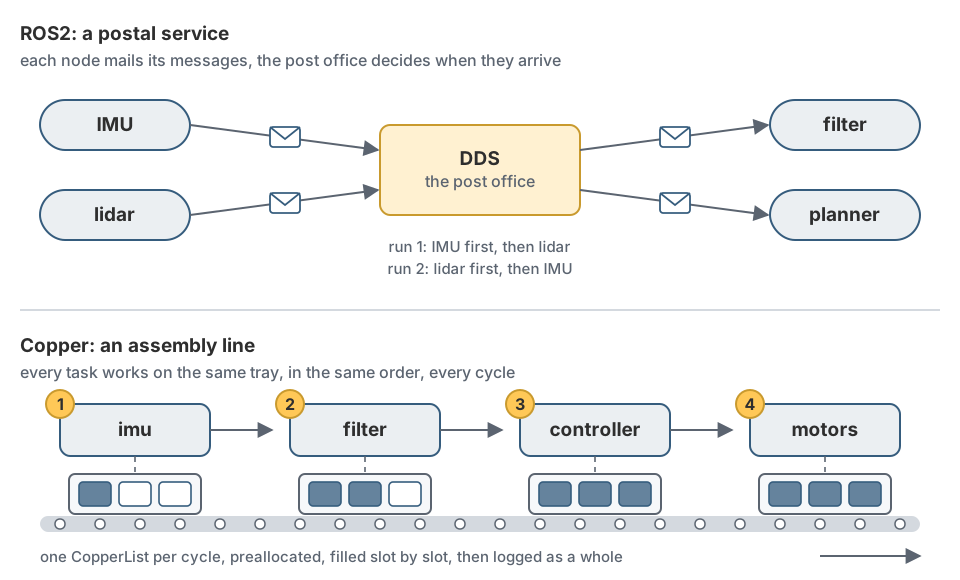
- ROS2 is a postal service for your robot. Each component is a separate program (a node) that mails messages to whoever subscribed, through a network layer called DDS, and everything is wired at runtime. It’s the fastest way to start, thanks to a huge ecosystem and solid tooling. But you pay for it every day: a heavy build environment, finicky networking, serialization overhead, non-deterministic execution, and bugs you can’t reproduce.
- Copper is an assembly line. Your whole robot is one Rust binary, the task graph is declared in a config file and checked at compile time, tasks run in a fixed order, and messages sit in preallocated trays instead of being mailed around. Everything is recorded, and any run can be replayed exactly. The trade-offs: a young ecosystem, Rust only, and bridges (ROS2, Zenoh) when you need to talk to the outside world.
What is ROS2, really?
Let’s get the name out of the way first. ROS stands for Robot Operating System, and it is not an operating system. It runs on top of one, almost always Ubuntu.
What ROS really is, is three things glued together:
- A middleware: a standard way for the different programs on your robot to talk to each other.
- A pile of tools: to build, launch, record, replay and inspect those programs.
- A huge ecosystem: thousands of open-source packages for drivers, mapping, navigation, arm planning, and so on.
How it works
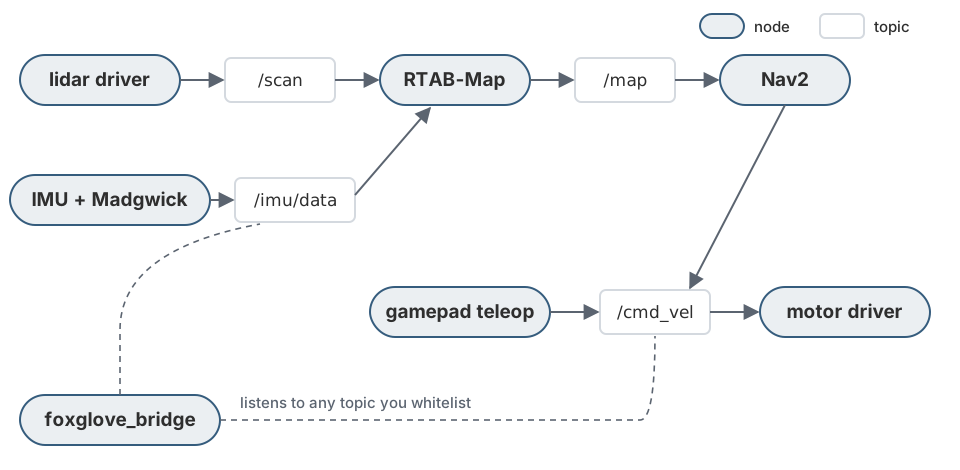
Let’s take a small autonomous robot as an example, with a lidar, an IMU and two motors, and look at what’s actually running on its computer when it navigates.
Nodes
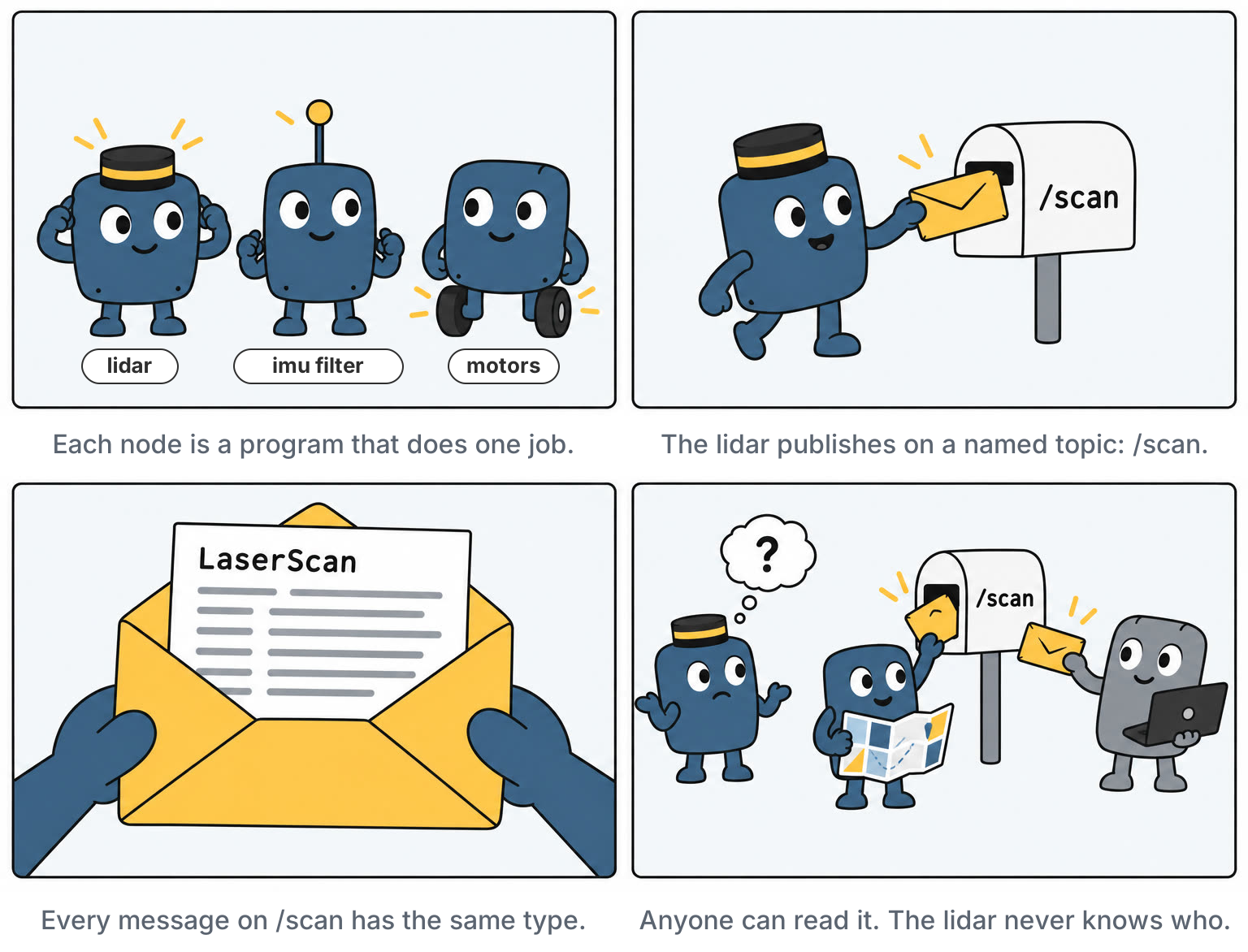
A node is a program that does one job. One node reads the lidar. One node reads the IMU and filters it. One node builds the map (RTAB-Map). One node plans paths (Nav2). One node drives the motors. You write nodes in C++ (with a library called rclcpp) or in Python (rclpy).
The philosophy is very Unix: small programs, each doing one thing well, that you compose together. On a small mobile robot, a full navigation session easily means a dozen nodes running side by side.
Topics and messages
Nodes talk through topics. A topic is just a named channel, like /scan or /cmd_vel. A node publishes messages on a topic, and any node that cares subscribes to it. This is the publish/subscribe pattern, and its main strength is decoupling: the lidar node has no idea who reads /scan. Could be RTAB-Map, could be Foxglove, could be nobody.
Every topic carries one message type, defined in a small .msg file. The lidar publishes a sensor_msgs/LaserScan, the navigation stack publishes a geometry_msgs/Twist on /cmd_vel (a linear and an angular speed), and so on.
Under the hood: DDS
ROS2 doesn’t actually move the bytes itself. It sits on top of DDS (Data Distribution Service), an industrial pub/sub standard that was originally built for things like defense and air traffic systems. Between your code and DDS there’s an abstraction layer called RMW (ROS MiddleWare), so you can swap the DDS implementation underneath: Fast DDS is the default on Jazzy, Cyclone DDS is a popular alternative, and more recently Zenoh joined the party.
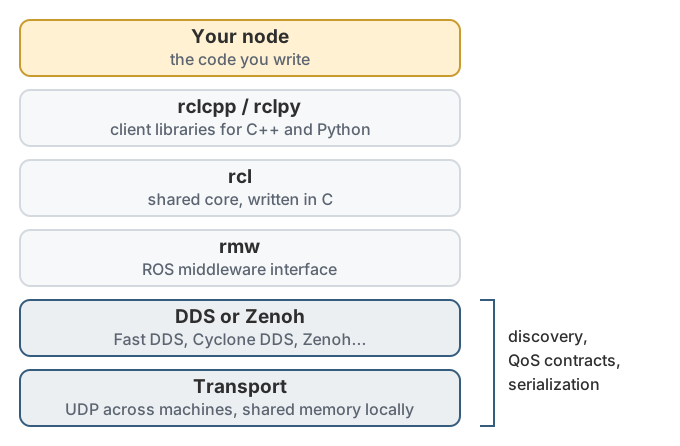
DDS brings three big things with it:
- Discovery: there’s no central master anymore. When a node starts, it announces itself on the network (via multicast), and nodes find each other automatically. Any machine on the same network and the same
ROS_DOMAIN_IDcan join the conversation. - Serialization: every message is converted to bytes (in a format called CDR) before it’s sent, and back on the other side. Even when both nodes run on the same computer.
- QoS (Quality of Service): every publisher and subscriber declares a contract. Should delivery be reliable (retry until it arrives) or best effort (drop it if it’s late)? Should a late joiner receive the last message (durability)? How many messages to keep in the queue (history depth)?
On paper, this design is decoupled and very flexible. In practice, each of these layers is a place where things can go wrong.
The might: why everyone starts with ROS2
Let’s be fair first, because there are good reasons the quote says companies start with ROS.
- The ecosystem is unmatched. Want mapping? There’s RTAB-Map. Navigation? Nav2. Two massive projects you don’t have to write. There’s a ROS2 driver for almost every sensor you can buy.
- The tooling is solid. You can record everything with
rosbag, visualize it in RViz or Foxglove , and poke at any topic from the command line. - It’s the common language. Tutorials, Q&A, papers, job postings: everyone speaks ROS.
- It’s fast to get going. Going from a pile of parts to a robot that drives around and avoids obstacles in a few weekends is impressive.
The blight: why it hurts
None of what follows is a showstopper on its own. The problem is that you pay all of it, all the time, as a tax on every day of development.
Pain 1: the build and the environment
Before you write a single line of robot logic, you have to fight the environment.
Each ROS2 distribution is pinned to one Ubuntu version. Jazzy wants Ubuntu 24.04, Humble wants 22.04. Want to use a library that needs a different version? Want to develop on a Mac? Welcome to Docker, which is how a big part of the community ends up building and running ROS.
A lighter option that has been really helpful to me recently is pixi
. It’s a package manager built on conda-forge, and thanks to the RoboStack
project, it can install ROS2 in a per-project environment, on Linux, macOS or Windows, with no Ubuntu pinning and no container. One pixi.toml, one lockfile, and pixi install gives everyone on the team the exact same setup. It removes a big chunk of the environment pain, but not all of it: you still build with colcon, and you still live in the ROS workspace world.
Then there’s the build system. You build with colcon, which orchestrates ament, which wraps CMake (for C++) or setuptools (for Python), each package with its own package.xml and build file. And before anything works, in every terminal, you need to source the environment:
source /opt/ros/jazzy/setup.bash
source install/setup.bash
Forget one of them and you get “package not found” errors for things that are very obviously there. Everyone forgets at some point.
Pain 2: DDS, the networking monster
Remember that beautiful automatic discovery? It relies on multicast, which many Wi-Fi routers, corporate networks and VPNs block or handle poorly. When discovery fails, nodes simply don’t see each other. Your laptop can’t see your robot’s topics, and nothing tells you why.
Then there’s QoS, the source of a very classic ROS2 bug. Sensor drivers typically publish with best effort (a lost lidar scan isn’t worth retrying, the next one is coming). Many subscribers default to reliable. A reliable subscriber and a best effort publisher are incompatible, so they never connect.
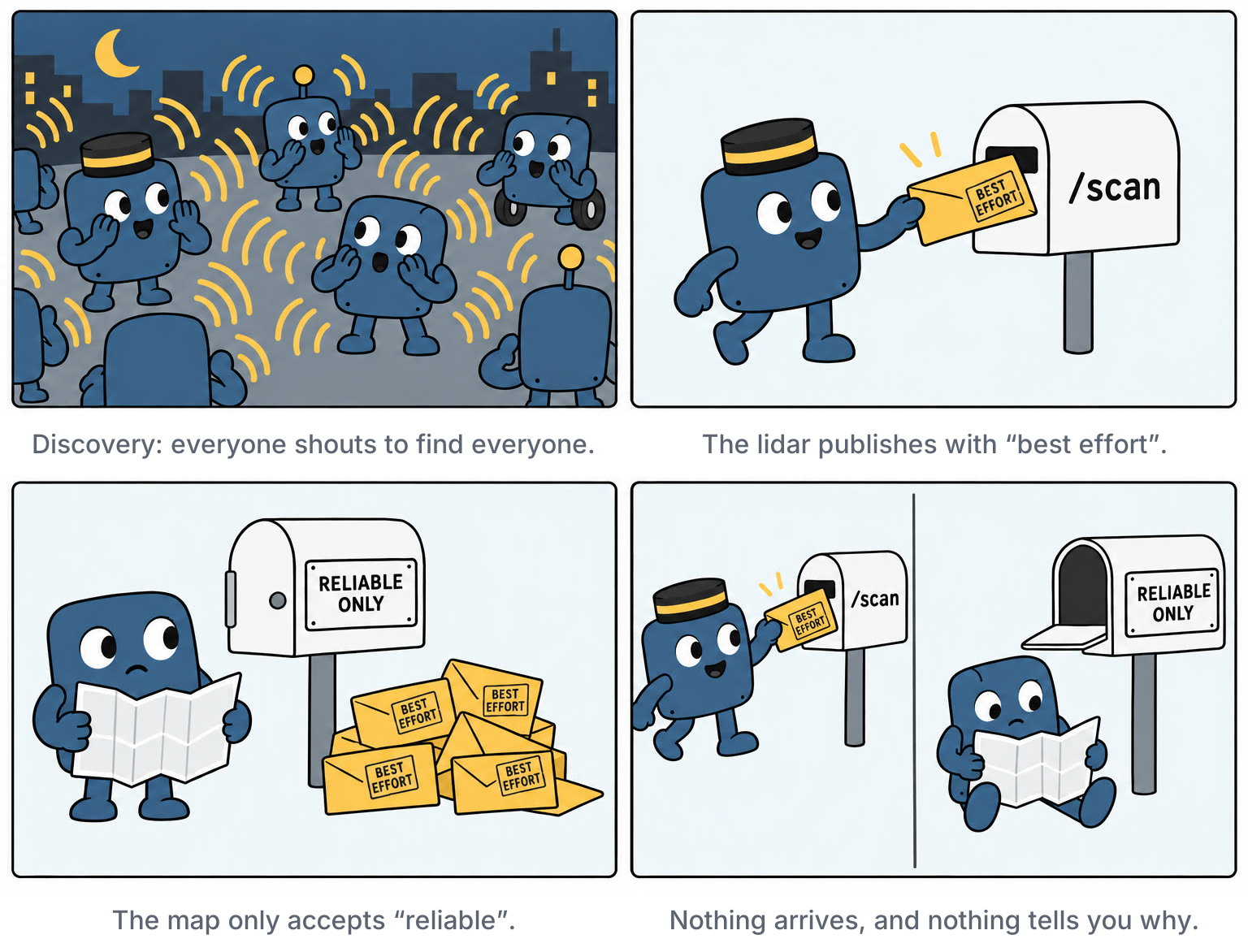
And when you need to tune DDS itself (buffer sizes, transports, discovery settings), you enter the world of vendor-specific XML configuration files. This is what Dave Allison means when he calls DDS a “huge unmaintainable monster”.
Pain 3: performance
The design that makes ROS2 so flexible also makes it expensive. By default, every message going from one node to another gets serialized, handed to DDS, transported (over the network, or through shared memory when both nodes are on the same machine), and deserialized on the other side. For small messages it doesn’t matter much. For a camera feed or a point cloud at 30 Hz, it’s a lot of copying and a lot of CPU.
There are escape hatches (running several nodes in the same process to share memory, “loaned messages”, tuned middleware), but each one adds complexity, and they’re not the default path most tutorials take.
On a small computer like a Raspberry Pi, this is very concrete. You’re usually CPU-bound, not memory-bound, and every bit of CPU spent on plumbing is CPU not spent on robotics.
Pain 4: non-determinism
This one is subtle, and probably the most important.
In ROS2, each node has an executor that decides when its callbacks run. Messages arrive whenever the network delivers them, timers fire whenever the OS gets to them, and with multiple threads, the order can change from one run to the next. Feed the exact same sensor data twice, and you can get two slightly different behaviors.
This matters most for debugging. When your robot does something weird once, you want to replay what happened and watch it happen again. You can record everything with rosbag, but replaying a bag just re-publishes the messages at roughly the right times. Your nodes still process them with whatever scheduling happens on that run. So the bug you saw on the robot may not happen again.
For a control loop, it’s even worse: you want to know that the controller runs every 10 ms, after the IMU reading and before the motor command, every single time.
Pain 5: debugging the whole thing
Put all of this together, and debugging ROS2 means juggling a dozen processes, each with its own threads, logs and parameters, talking through a middleware you can’t easily see. A typo in a topic name doesn’t raise any error: you just get a topic nobody listens to. A wrong message type, a missing remap in a launch file, a parameter file that wasn’t loaded: all of these show up at runtime, if they show up at all.
The most common question you’ll ask yourself with ROS2 is: “why is this topic empty?”
Getting out of ROS
So what do companies do once the tax gets too high? Roughly three things:
- Build their own middleware. Dave Allison’s post was actually announcing his: Subspace, a shared-memory IPC system, and AdAstra, a process launcher. Many robotics companies have an in-house equivalent.
- Swap the plumbing. Keep ROS2, but replace the DDS layer underneath. These days, that mostly means Zenoh.
- Rethink the whole thing. A new generation of frameworks, often written in Rust, starts from different assumptions.
The second option is the least disruptive, so it deserves a closer look.
Swapping the plumbing: Zenoh
Zenoh is a communication protocol from the Eclipse Foundation, written in Rust. Like DDS, it does publish/subscribe. Unlike DDS, it was designed from day one for messy, real-world networks: flaky Wi-Fi, cellular, robot-to-cloud links, and even tiny microcontrollers (with a lightweight version called zenoh-pico).
Remember the RMW layer in the stack diagram, the one that lets you swap what’s underneath ROS2? Zenoh plugs in at that level. With rmw_zenoh, your nodes don’t change at all, only the plumbing does. And it’s now an officially supported option in ROS2.
What Zenoh solves. Mostly Pain 2, the networking monster:
- Discovery that works. Instead of every node shouting on the network with multicast, nodes find each other through a small router process. No more topics that are invisible because the Wi-Fi router doesn’t like multicast.
- Crossing networks. Routers can be chained across networks and through the internet, so laptop-to-robot, robot-to-cloud or a whole fleet becomes realistic. With DDS, this is notoriously hard.
- Simpler configuration. No more vendor-specific XML.
- Smooth migration. A bridge can connect an existing DDS-based ROS2 system to Zenoh, so you don’t have to switch everything at once.
What Zenoh doesn’t solve. Pretty much everything else:
- Determinism (Pain 4). Zenoh only changes how messages travel. Your callbacks still run whenever the executor gets to them, and your rosbag replay is still not exact.
- Serialization (Pain 3). ROS2 still converts every message to bytes and back. Zenoh moves those bytes more efficiently, but the per-message cost of the ROS2 model stays.
- Runtime-only wiring (Pain 5). A typo in a topic name is still just a topic nobody listens to.
- The build and the environment (Pain 1). Still colcon, still
source setup.bash, still pinned to an Ubuntu version. - One more thing to run. For discovery, the router needs to be up and reachable. If it’s down when a node starts, that node won’t find the others.
To fix the rest, you have to rethink the whole thing. That last category is where I landed.
Enter copper-rs
Copper describes itself as “a Rust runtime for building, running, recording, and deterministically replaying static robot task graphs, from Linux to bare metal.”
In short, Copper makes the opposite trade-off from ROS2. ROS2 decides almost everything at runtime: which nodes exist, who talks to whom, when callbacks run. Copper decides almost everything at compile time. Your robot’s architecture is fixed before the program even starts, and Copper uses that knowledge to make it fast, predictable and replayable.
Tasks, not nodes
In Copper, the building block is a task, the equivalent of a node. There are three kinds:
- Sources produce data (read a sensor).
- Tasks transform data (filter, plan, control).
- Sinks consume data (drive a motor).
Unlike nodes, tasks are Rust structs, all compiled into a single binary, all living in the same process. No discovery, no network stack between them, no serialization. And it’s a regular Rust project: you build it with cargo build, there’s no workspace to source, no distribution pinned to an Ubuntu version, and deploying means copying one file to the robot.
The graph lives in a config file
You describe how tasks are wired together in a configuration file, copperconfig.ron. Here’s what a slice of a small robot’s control loop could look like in Copper:
(
    tasks: [
        (id: "imu", type: "tasks::ImuSource", config: {"i2c_bus": 1}),
        (id: "filter", type: "tasks::Madgwick"),
        (id: "controller", type: "tasks::Controller"),
        (id: "motors", type: "tasks::MotorDriver"),
    ],
    cnx: [
        (src: "imu", dst: "filter", msg: "tasks::ImuReading"),
        (src: "filter", dst: "controller", msg: "tasks::Orientation"),
        (src: "controller", dst: "motors", msg: "tasks::WheelSpeeds"),
    ],
)
Each task has an id and a Rust type, and each connection (cnx) says who sends what to whom, with the exact message type.
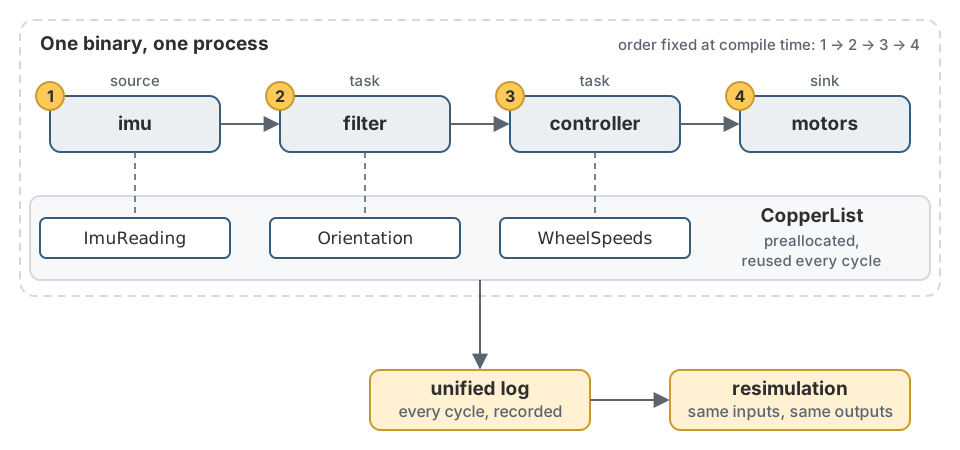
Your application itself is a single struct with one macro on top, #[copper_runtime(config = "copperconfig.ron")]. At build time, that macro reads the config and generates the code that wires the tasks together. If a task doesn’t exist, or if you connect a task that outputs an Orientation to one that expects WheelSpeeds, your program doesn’t compile. The compiler catches the “why is this topic empty?” class of bugs before the robot ever moves.
How a cycle runs
Since Copper knows the whole graph at compile time, it also computes the execution order at compile time. Here, it’s always: read the IMU, then filter, then control, then drive the motors. Same order, every cycle, no executor making decisions on the fly. Time-critical tasks run back-to-back on the same thread, for low latency and low jitter.
The messages themselves live in a structure called a CopperList. Think of it as a tray going down an assembly line: it has one slot for every message of the cycle. The lidar drops its scan in the first slot, the IMU its reading in the next one, and the motor controller reads both and writes its command in the last one. All these trays are preallocated when the program starts, and reused cycle after cycle. So in the hot loop, there is no memory allocation, no serialization, and no copy between tasks.
For heavy work that would slow the whole line down, like processing a camera image, you can mark a task as background in the config, and Copper runs it on a separate thread pool without blocking the critical path.
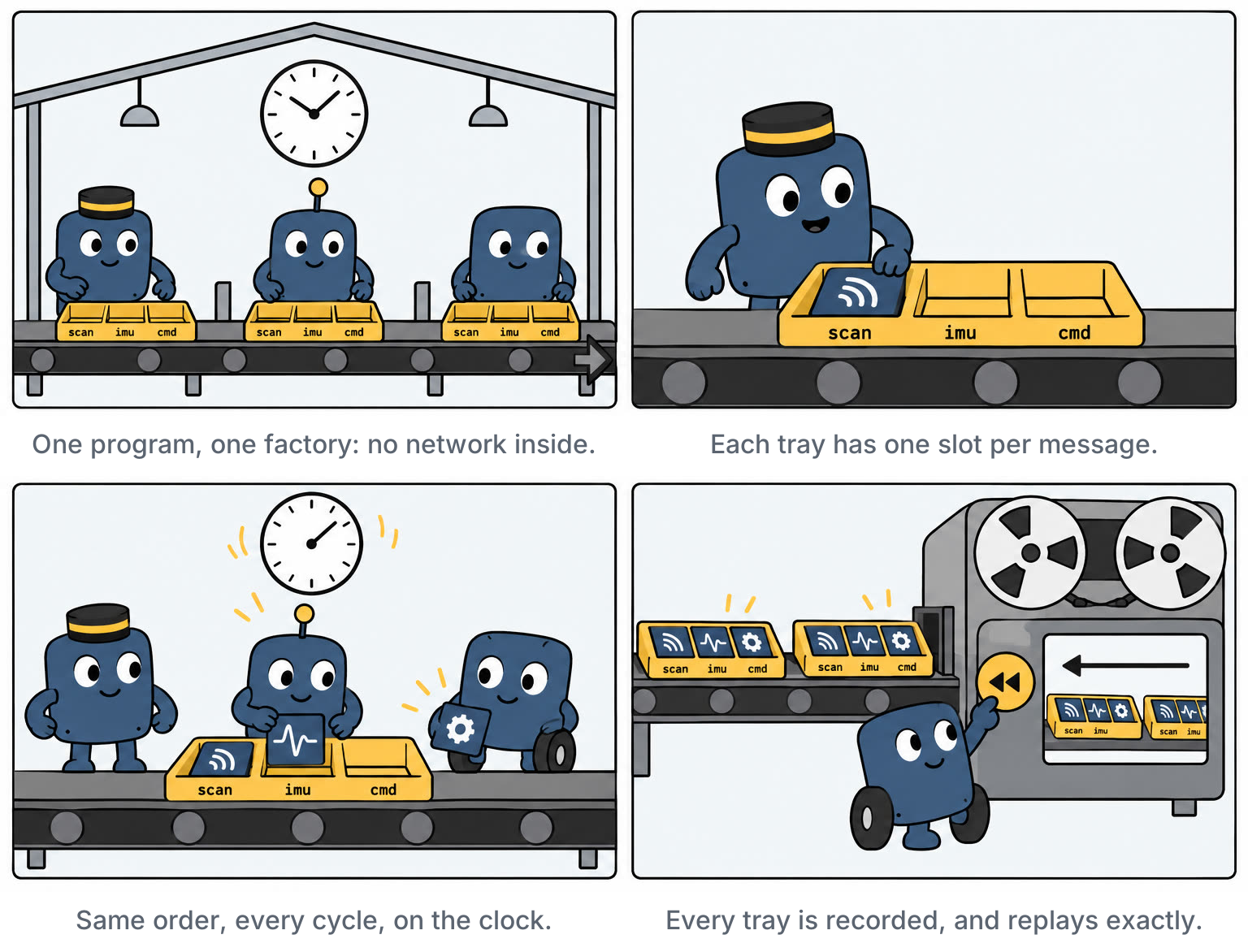
Copper: an assembly line. Every station works on the same tray, in the same order, every single time.
Record everything, replay exactly
Because every cycle is one CopperList, logging is almost free: Copper writes each tray to a single unified log file, along with the timing and the text logs. Even the text logs are cheap, because log strings are indexed at compile time, so at runtime Copper only records small identifiers and values instead of formatting text.
Time in Copper goes through a RobotClock that can be mocked. So you can take a log recorded on the robot, feed it back through your tasks with the clock set to the recorded times, and get the exact same outputs, bit for bit (as long as your own task code is deterministic). Copper calls this resimulation. It can also snapshot task state at regular keyframes, so you can jump into the middle of a long recording instead of replaying it from the start.
That’s the cure for Pain 4, and a big part of the cure for Pain 5. When something goes wrong on the robot, you bring the exact failing moment back to your laptop, set a breakpoint in the filter, replay, tweak, and replay again, as many times as you need. And while the robot runs, a console monitor lets you watch every task live.
Not burning the bridges
You don’t have to throw away ROS2 to use Copper. It has bridges to talk to the outside world, including a ROS2 bridge: you declare channels in the config that map to ROS2 topics, and Copper publishes or subscribes to them like any other node. So you can keep your existing visualization and tooling, and migrate one piece at a time. And when you do need to split your robot across several machines, there’s a bridge for the same Zenoh we talked about earlier. The philosophy is different: in ROS2, every message goes through the post office. In Copper, everything stays on the assembly line, and you only use the post office for what actually needs to leave the factory.
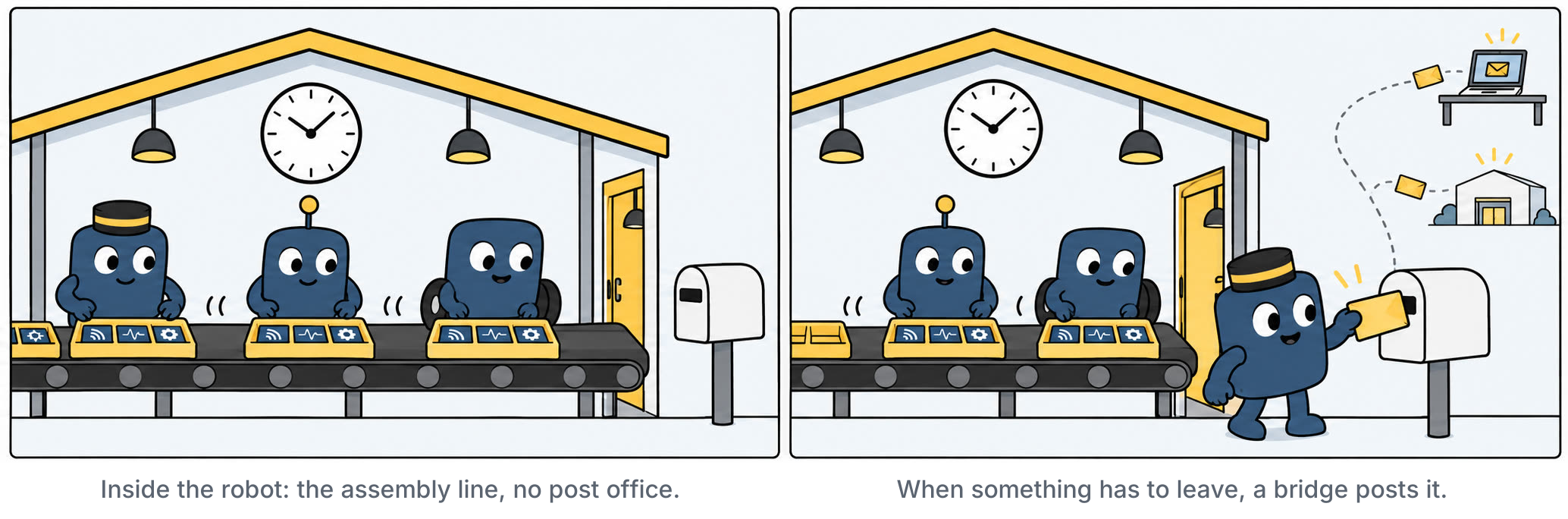
A question that comes up often: “one binary is nice, but I need several processes, for safety or reliability”. For example, you want the motor controller to keep running even if the planner crashes. Copper handles this with subsystems: each one is its own Copper process with its own config, and a top-level file declares the typed interconnects between them. You still get one assembly line per process, and each process keeps its own log, so the whole system can still be replayed.
The trade-offs
Copper isn’t free either:
- The ecosystem is young. There’s no Nav2 or MoveIt equivalent. There are drivers for common hardware, but far fewer than ROS2, so you’ll write more yourself.
- Rust. If you don’t know it, it’s a real learning curve, especially coming from Python.
- A static graph is, well, static. You can’t spin up a new node on the fly while the robot runs. That’s by design, but it’s less flexible for quick experiments.
- Fewer people to ask. When you’re stuck, there’s no ten-year backlog of forum answers.
ROS2 vs copper-rs
Let’s put everything side by side, with our five pains:
| ROS2 | copper-rs | |
|---|---|---|
| Language | C++, Python | Rust |
| Building block | Nodes (separate processes) | Tasks (structs in one binary) |
| Build & environment (Pain 1) | colcon, ament, sourcing, distro tied to Ubuntu | cargo build, one binary |
| Networking (Pain 2) | DDS discovery and QoS contracts at runtime | One process, no discovery. Bridges only when you need them |
| Performance (Pain 3) | Serialization and copies between nodes by default | Preallocated trays, no allocation, serialization or copy in the hot loop |
| Determinism (Pain 4) | Executors decide at runtime, order can change | Order fixed at compile time, explicit clock, exact resimulation |
| Debugging (Pain 5) | Wiring mistakes found at runtime, if ever. rosbag replay isn’t exact | Wiring mistakes are compile errors. Failures can be replayed exactly |
| Ecosystem | Huge | Young |
| Runs on | Linux, mainly Ubuntu | Linux, macOS, down to bare-metal microcontrollers |
| Great for | Prototyping fast, leaning on existing packages | Control loops, performance, reproducible debugging |
So, blight or might?
Both, and that’s what the quote says.
ROS2 is the might. No other tool gets you from zero to a robot that maps and navigates as fast. The ecosystem is huge, the tooling is solid, and it’s still the common language of the robotics world. If you’re learning robotics, or prototyping something new, starting with ROS2 is a perfectly sane choice. It’s why everyone starts there.
ROS2 is also the blight. The postal service that makes it so flexible is also what makes it heavy: the build environment, the networking, the serialization, the unpredictable timing, the bugs you can’t reproduce. You don’t feel it in a tutorial, only once your robot has to run fast, on a small computer, and behave the same way twice. That’s when companies start digging.
Copper takes the opposite bet: decide everything at compile time, run it like an assembly line, record everything. It’s younger, it asks you to write Rust, and its ecosystem is a fraction of ROS2’s. But for the core of a robot, the loop that reads sensors, decides and moves, it solves the pains that push people out of ROS. And with its bridges, you don’t have to choose: keep the ROS2 tooling around the edges, and put the critical path on the assembly line.